
欢迎您访问我爱IT技术网,今天小编为你分享的编程技术是:【如何实现.net程序的进程注入】,下面是详细的分享!
如何实现.net程序的进程注入
进程注入比较常见,比如用IDE调试程序以及一些Spy程序,如果仅仅为了与调试器通讯,可以使用。net提供的Debugger接口(在EnvDTE.dll的EnvDTE命名空间下)。但无论出于什么目的,进程注入都是比较好玩的事情,所以不妨一试 . 进程注入的方法貌似很多(比如像特洛伊一样乔装打扮让目标进程误认为你的程序集合法而加载到目标进程),这里提到的仅是其中的一种或某些方法的结合。
大致原理是这样的:
源进程(也就是你的代码所在的进程)获得目标进程(也就是你的注入目标所在的进程)的ID或进程对象
源进程提供一回调函数methodA(也就是你想要注入到目标进程后所执行的代码)
将目标进程和回调函数methodA的完整路径(其所在的Assembly,Classic以及MethodName)提交给Injector(也就是我们编写的负责注入的类),让Injector来完成注入和让目标进程执行回调函数
Injector根据提供的目标进程ID取得目标进程对象,并获得目标进程的一个线程(我们称为目标线程)
在目标线程中分配一块内存,将回调函数methodA的完整路径作为字符串存入该内存中
Injector在目标进程中安装一个钩子(Hook)监视某一个Windows消息(messageA),撰写钩子的回调函数methodB(该方法中的内容稍后解释)
像目标进程发消息messageA,并将刚才分配的内存的基地址作为消息参数传递。
由于我们针对messageA安装了钩子,所以目标进程会调用我们钩子函数methodB,并会把分配的内存的基地址包含在函数参数中
methodB中, 根据函数参数中的内存基地址在内存中解析出其实际对象,也就是一个表示我们的methodA的完整路径的字符串。根据该字符串中所表示的Assembly,className, methodName利用。net反射,反射出其MethodInfo对象(注意,关键点,methodB被回调时已经是在目标进程的某个线程中了)。
以下为引用的内容:
#include "stdafx.h"
#include "Injector.h"
#include <vcclr.h>
using namespace ManagedInjector;
//defines a new window message that is guaranteed to be unique throughout the system.
//The message value can be used when sending or posting messages.
static unsigned int WM_GOBABYGO=::RegisterWindowMessage(L"Injector_GOBABYGO!");
static HHOOK _messageHookHandle;
//-----------------------------------------------------------------------------
//Spying Process functions follow
//-----------------------------------------------------------------------------
void Injector::Launch(System::IntPtr windowHandle, System::Reflection::Assembly^ assembly, System::String^ className, System::String^ methodName) {
System::String^ assemblyClassAndMethod=assembly->Location + "$" + className + "$" + methodName;
//convert String to local wchar_t* or char*
pin_ptr<const wchar_t> acmLocal=PtrToStringChars(assemblyClassAndMethod);
//Maps the specified executable module into the address space of the calling process.
HINSTANCE hinstDLL=::LoadLibrary((LPCTSTR) _T("ManagedInjector.dll"));
if (hinstDLL)
{
DWORD processID=0;
//get the process id and thread id
DWORD threadID=::GetWindowThreadProcessId((HWND)windowHandle.ToPointer(), &processID);
if (processID)
{
//get the target process object (handle)
HANDLE hProcess=::OpenProcess(PROCESS_ALL_ACCESS, FALSE, processID);
if (hProcess)
{
int buffLen=(assemblyClassAndMethod->Length + 1) * sizeof(wchar_t);
//Allocates physical storage in memory or in the paging file on disk for the specified reserved memory pages.
//The function initializes the memory to zero.
//The return value is the base address of the allocated region of pages.
void* acmRemote=::VirtualAllocEx(hProcess, NULL, buffLen, MEM_COMMIT, PAGE_READWRITE);
if (acmRemote)
{
//copies the data(the assemblyClassAndMethod string)
//from the specified buffer in the current process
//to the address range of the target process
::WriteProcessMemory(hProcess, acmRemote, acmLocal, buffLen, NULL);
//Retrieves the address of MessageHookProc method from the hintsDLL
HOOKPROC procAddress=(HOOKPROC)GetProcAddress(hinstDLL, "MessageHookProc");
//install a hook procedure to the target thread(before the system sends the messages to the destination window procedure)
_messageHookHandle=::SetWindowsHookEx(WH_CALLWNDPROC, procAddress, hinstDLL, threadID);
if (_messageHookHandle)
{
//send our custom message to the target window of the target process
::SendMessage((HWND)windowHandle.ToPointer(), WM_GOBABYGO, (WPARAM)acmRemote, 0);
//removes the hook procedure installed in a hook chain by the SetWindowsHookEx function.
::UnhookWindowsHookEx(_messageHookHandle);
}
//removes a hook procedure installed in a hook chain by the SetWindowsHookEx function.
::VirtualFreeEx(hProcess, acmRemote, buffLen, MEM_RELEASE);
}
::CloseHandle(hProcess);
}
}
//Decrements the reference count of the loaded DLL
::FreeLibrary(hinstDLL);
}
}
__declspec( dllexport )
// The procedure for hooking, this will be called back after hooked
int __stdcall MessageHookProc(int nCode, WPARAM wparam, LPARAM lparam) {
//HC_ACTION: indicate that there are argments in wparam and lparam
if (nCode==HC_ACTION)
{
CWPSTRUCT* msg=(CWPSTRUCT*)lparam;
//when the target window received our custom message
if (msg !=NULL && msg->message==WM_GOBABYGO)
{
//get the argument passed by the message
//actually, the argument is the base address (a pointer)
//of the assemblyClassAndMethod string in the target process memory
wchar_t* acmRemote=(wchar_t*)msg->wParam;
//gcnew: creates an instance of a managed type (reference or value type) on the garbage collected heap
System::String^ acmLocal=gcnew System::String(acmRemote);
//split the string into substring array with $. Under this context:
//acmSplit[0]:the assembly's location
//acmSplit[1]:className;
//acmSplit[2]:methodName
//we use these infomation to reflect the method in the source assembly, and invoke it in the target process
cli::array<System::String^>^ acmSplit=acmLocal->Split('$');
//refect the method, and invoke it
System::Reflection::Assembly^ assembly=System::Reflection::Assembly::LoadFile(acmSplit[0]);
if (assembly !=nullptr)
{
System::Type^ type=assembly->GetType(acmSplit[1]);
if (type !=nullptr)
{
System::Reflection::MethodInfo^ methodInfo=
type->GetMethod(acmSplit[2], System::Reflection::BindingFlags::Static | System::Reflection::BindingFlags::Public);
if (methodInfo !=nullptr)
{
methodInfo->Invoke(nullptr, nullptr);
}
}
}
}
}
return CallNextHookEx(_messageHookHandle, nCode, wparam, lparam);
}
接下来,做个DEMO尝试一下:
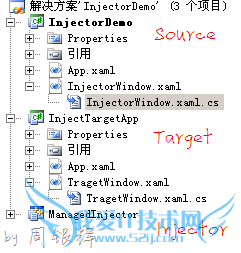
解决方案中的InjectorDemo就是我们上述的源进程,它会利用Injector将下面这段代码注入到Target进程中并执行:
|
以下为引用的内容: public static void DoSomethingEvie() if(targetWindow !=null) |
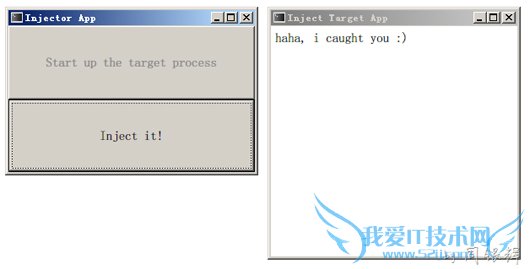
也就是说InjectorDemo进程会将InjectTargetApp进程的主窗口的内容修改成"haha, i caught you"这样的一个Label.
运行程序:
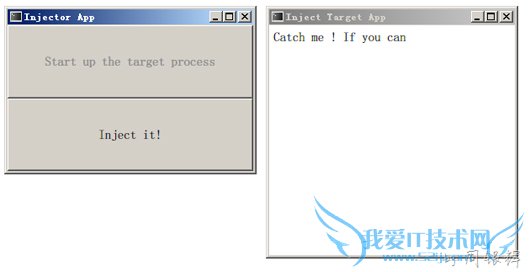
上面的两个窗口分别处于不同的进程中, 点击 "Inject it" 按钮, 其辉调用如下代码:
|
以下为引用的内容: ManagedInjector.Injector.Launch(targetProcess.MainWindowHandle, typeof(InjectorWindow).Assembly, typeof(InjectorWindow).FullName, "DoSomethingEvie"); |
以上所分享的是关于如何实现.net程序的进程注入,下面是编辑为你推荐的有价值的用户互动:
相关问题:如何实现.net程序的进程注入
答:进程注入比较常见,比如用IDE调试程序以及一些Spy程序,如果仅仅为了与调试器通讯,可以使用.net提供的Debugger接口(在EnvDTE.dll的EnvDTE命名空间下).但无论出于什么目的,进程注入都是比较好玩的事情,所以不妨一试 . 进程注入的方法貌似很多(比如... >>详细
相关问题:将dll注入某个目标进程之后如何在当前程序操纵目标...
答:(DYNAMIC LINK LIBRARY)和Windows系统紧密相关。 收容了几乎一切WIN32 ,提供了绝大多数功能调用。DLL( )注入技术,就是把要注入的代码写到DLL中,然后让目标进程加载这个DLL。对DLL的注入方式及应用进行探讨,从而使之更好地发挥作用。 0 在Win32环... >>详细
相关问题:程序注入怎么回事
答:线程注入式木马 更好的隐藏方式是使木马程序不以进程和服务的方式存在,而是完全溶入系统内核。因此,在设计时,我们不应把它做成一个应用程序,而是做成一个可以注入应用程序地址空间的线程。该应用程序必须确保绝对安全,这样才能达到彻底隐藏... >>详细
- 评论列表(网友评论仅供网友表达个人看法,并不表明本站同意其观点或证实其描述)
-