
欢迎您访问我爱IT技术网,今天小编为你分享的电脑教程是日常使用电脑方面的电脑常识:让你的Mac给你读课文,学会并运用这些电脑常识,让你快速玩转电脑及互联网方面的知识,下面是详细的分享!
让你的Mac给你读课文
有没有想过在你浏览网页的时候你可以躺在床上不必看着屏幕就有人能帮你读出网页的内容?用过这篇文章中的技巧以后,美梦就可以成真啦! 首先在System Preference里面选择Speech。然后选择Text to Speech选项标签,下图中1所示。
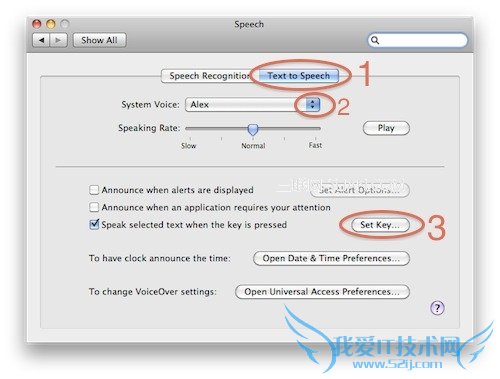
然后你可以在图中2所示位置选择你喜欢的声音。(别忘了试试里面最下面的Show More Voices)点击图中3所示位置可以为朗读定义快捷键。如下图我定义的是ctrl+`键。
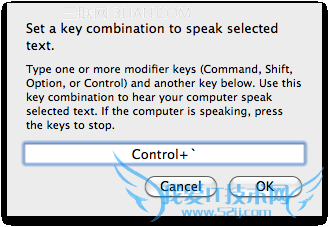
设定完成之后,你就可以在任何可以选择文字的软件里面选中一段文字然后按下快捷键让你的Mac帮你读出来了。(暂不支持中文朗读)不妨试试下面这段:
The Crazy Ones - Full Version Here’s to the crazy ones. The misfits. The rebels. The troublemakers. The round pegs in the square holes. The ones who see things differently. They’re not fond of rules. And they have no respect for the status quo. You can quote them, disagree with them, glorify or vilify them. About the only thing you can’t do is ignore them. Because they change things. They push the human race forward. And while some may see them as the crazy ones, we see genius. Because the people who are crazy enough to think they can change the world, are the ones who do.
以上就是关于让你的Mac给你读课文的电脑常识分享,更多电脑教程请移步到>>电脑教程频道。
- 评论列表(网友评论仅供网友表达个人看法,并不表明本站同意其观点或证实其描述)
-